Open Ticket
  +373 79 600002
  Telegram Live Chat
  F.A.Q
F.A.Q  English
 Русский
  Română
  Deutsch
  Français
  Türkçe
  Español
  Português
  Українська
  български
  Polski
  Indonesia
  中文 (中国)






































































































































 on All Hosting Services






Using Redis Scan Commands on Linux: A Complete Guide
Redis is a high-performance, open-source, in-memory data structure store widely used as a key-value database, cache, and message broker. Among its most powerful — yet often underutilized — features are the scan commands, which allow you to incrementally iterate through large datasets without blocking your server or degrading performance.
If you're running Redis on a Linux-based server, mastering scan commands is essential for building scalable, production-ready applications. Unlike the dangerous KEYS command, which retrieves all matching keys in a single blocking operation, scan commands return data in small, manageable batches — making them the correct tool for any environment handling significant data volumes.
In this comprehensive guide, you'll learn exactly how to use SCAN, SSCAN, HSCAN, and ZSCAN in Redis on Linux, complete with real-world examples, shell scripts, and best practices for production deployments.
What Are Redis Scan Commands?
Redis scan commands provide a cursor-based, non-blocking mechanism for iterating over keys, sets, hashes, and sorted sets. Each command returns a small subset of elements per call along with a cursor value, which you use to continue the iteration in subsequent calls. When the cursor returns to 0, the full dataset has been traversed.
This approach is fundamentally safer and more efficient than KEYS, which blocks the entire Redis server until it finishes scanning — a critical problem in production environments with millions of keys.
The Four Core Scan Commands
| Command | Purpose |
|---|---|
SCAN | Iterates over keys in the entire keyspace |
SSCAN | Iterates over elements in a Set |
HSCAN | Iterates over fields and values in a Hash |
ZSCAN | Iterates over members and scores in a Sorted Set |
Basic Syntax of Scan Commands
All four scan commands share a consistent syntax structure:
SCAN cursor [MATCH pattern] [COUNT count]
SSCAN key cursor [MATCH pattern] [COUNT count]
HSCAN key cursor [MATCH pattern] [COUNT count]
ZSCAN key cursor [MATCH pattern] [COUNT count]
Parameters Explained
cursor— An integer representing the current position in the iteration. Always start with0to begin a new scan. Redis returns a new cursor with each response; use it in the next call to continue.MATCH pattern*(optional)* — Filters results using glob-style pattern matching (e.g.,user:*,*session*). Note: filtering happens *after* retrieval, so low-density matches may require many iterations.COUNT count*(optional)* — A hint to Redis suggesting how many elements to return per iteration. This is not a hard limit; Redis may return more or fewer. The default is10.
Installing Redis on Linux
Before using scan commands, you need Redis installed and running on your Linux server. Whether you're on a high-traffic production environment or a development machine, the installation process is straightforward.
> Tip: For production workloads requiring Redis at scale, consider deploying on a VPS Hosting plan or a Dedicated Server to ensure you have the memory, CPU, and I/O resources Redis demands.
Installing Redis on Debian/Ubuntu
sudo apt update
sudo apt install redis-server -y
Installing Redis on CentOS/RHEL
sudo yum install redis -y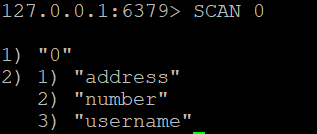
Starting the Redis Service
sudo systemctl start redis
sudo systemctl enable redis
Verifying the Installation
sudo systemctl status redisYou should see active (running) in the output. Now connect to the Redis CLI:
redis-cliOnce inside the CLI, test the connection:
127.0.0.1:6379> PING
PONG
You're ready to start using scan commands.
Using the SCAN Command
The SCAN command iterates over all keys in the Redis keyspace. It is the general-purpose replacement for the KEYS command in production environments.
Example 1: Basic SCAN
To begin scanning all keys in the database, start with cursor 0:
SCAN 0Sample output:
1) "14"
2) 1) "session:abc123"
   2) "user:1001"
   3) "product:55"
The first element (14) is the next cursor. Use it in your next SCAN call. When the returned cursor is 0, the full iteration is complete.
Example 2: Filtering Keys with MATCH
To retrieve only keys matching a specific pattern — for example, all keys prefixed with user::
SCAN 0 MATCH user:*This returns only keys whose names begin with user:. Keep iterating until the cursor returns 0 to ensure you've scanned the entire keyspace.
Example 3: Controlling Batch Size with COUNT
To suggest that Redis return approximately 100 keys per iteration:
SCAN 0 COUNT 100Remember: COUNT is a *hint*, not a guarantee. Redis may return slightly more or fewer results depending on internal data structures.
Example 4: Full Keyspace Iteration with a Shell Script
In real-world scenarios, you'll need to loop through the entire keyspace programmatically. Here's a production-ready Bash script that iterates through all keys matching a pattern:
#!/bin/bash

cursor=0
echo "Starting full keyspace scan..."

while true; do
    # Execute SCAN and capture the result
    result=$(redis-cli SCAN $cursor MATCH user:* COUNT 100)

    # Extract the new cursor (first line of output)
    cursor=$(echo "$result" | head -n 1)

    # Extract and display the keys (remaining lines)
    keys=$(echo "$result" | tail -n +2)
    echo "Keys found:"
    echo "$keys"

    # Break the loop when cursor returns to 0
    if [[ "$cursor" == "0" ]]; then
        echo "Scan complete."
        break
    fi
done
To run this script:
chmod +x scan_keys.sh
./scan_keys.sh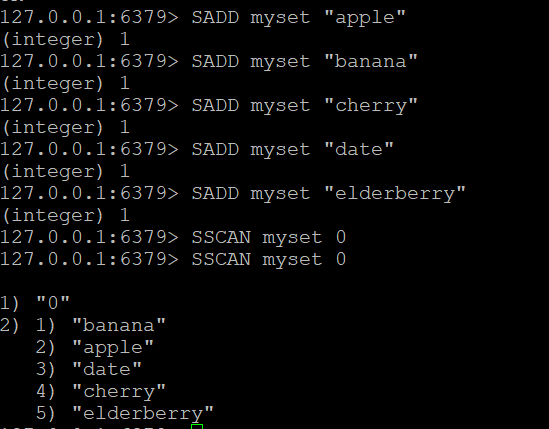

Using the SSCAN Command
SSCAN is used to incrementally iterate through the members of a Redis Set. It follows the same cursor-based pattern as SCAN.
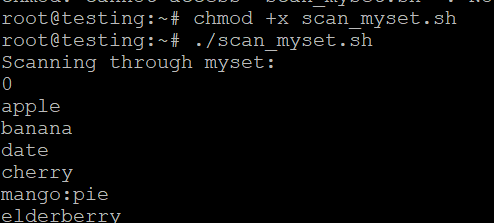
Step 1: Create a Set and Add Members
SADD myset "apple"
SADD myset "banana"
SADD myset "cherry"
SADD myset "date"
SADD myset "elderberry"
SADD myset "mango"
SADD myset "mango:tropical"
SADD myset "mango:dried"
Step 2: Basic SSCAN
Scan all elements in myset starting from cursor 0:
SSCAN myset 0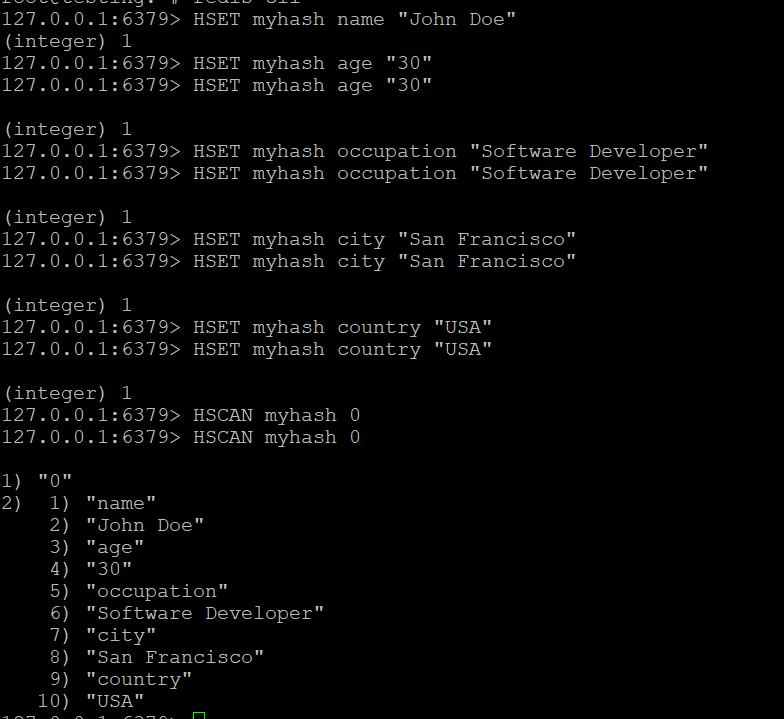
Step 3: Filter Elements with MATCH
To retrieve only elements that match the pattern mango:*:
SSCAN myset 0 MATCH mango:*Step 4: Iterating Through a Set with a Shell Script
#!/bin/bash

cursor=0
echo "Scanning through myset:"

while true; do
    # Scan the set
    result=$(redis-cli SSCAN myset $cursor COUNT 10)

    # Update cursor
    cursor=$(echo "$result" | head -n 1)

    # Print elements returned
    elements=$(echo "$result" | tail -n +2)
    echo "Elements: $elements"

    # Stop when cursor returns to 0
    if [[ "$cursor" == "0" ]]; then
        echo "Set scan complete."
        break
    fi
done
Save as scan_myset.sh, make it executable, and run:
chmod +x scan_myset.sh
./scan_myset.sh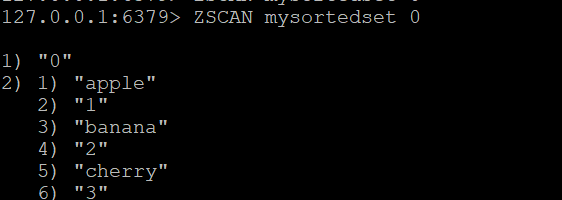
Using the HSCAN Command
HSCAN iterates through the fields and values of a Redis Hash. This is particularly useful when a hash contains hundreds or thousands of fields and you need to process them without loading everything into memory at once.
Step 1: Create a Hash and Add Fields
HSET myhash name "John Doe"
HSET myhash age "30"
HSET myhash occupation "Software Developer"
HSET myhash city "San Francisco"
HSET myhash country "USA"
HSET myhash email "john@example.com"
Step 2: Basic HSCAN
HSCAN myhash 0Sample output:
1) "0"
2) 1) "name"
   2) "John Doe"
   3) "age"
   4) "30"
   5) "occupation"
   6) "Software Developer"
   ...
Results are returned as alternating field-value pairs.
Step 3: Filter Hash Fields with MATCH
To retrieve only fields whose names contain "city" or match a pattern:
HSCAN myhash 0 MATCH *city*Step 4: Iterating Through a Hash with a Shell Script
#!/bin/bash

cursor=0
echo "Scanning hash: myhash"

while true; do
    result=$(redis-cli HSCAN myhash $cursor COUNT 10)
    cursor=$(echo "$result" | head -n 1)
    fields=$(echo "$result" | tail -n +2)

    echo "Fields and values:"
    echo "$fields"

    if [[ "$cursor" == "0" ]]; then
        echo "Hash scan complete."
        break
    fi
done
Using the ZSCAN Command
ZSCAN iterates through the members and scores of a Redis Sorted Set. Sorted sets are commonly used for leaderboards, priority queues, and time-series data — all scenarios where scanning large collections efficiently is critical.
Step 1: Create a Sorted Set and Add Members
ZADD mysortedset 1 "apple"
ZADD mysortedset 2 "banana"
ZADD mysortedset 3 "cherry"
ZADD mysortedset 4 "date"
ZADD mysortedset 5 "elderberry"
Step 2: Basic ZSCAN
ZSCAN mysortedset 0Sample output:
1) "0"
2) 1) "apple"
   2) "1"
   3) "banana"
   4) "2"
   5) "cherry"
   6) "3"
Results are returned as alternating member-score pairs.
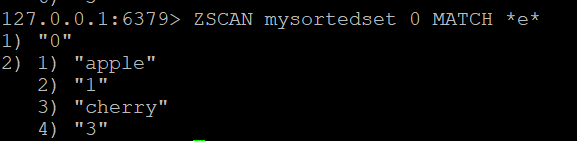
Step 3: Filter Members with MATCH
To find all members whose names contain the letter "e":
ZSCAN mysortedset 0 MATCH *e*Step 4: Full Sorted Set Iteration Script
#!/bin/bash

cursor=0
echo "Scanning sorted set: mysortedset"

while true; do
    result=$(redis-cli ZSCAN mysortedset $cursor COUNT 10)
    cursor=$(echo "$result" | head -n 1)
    members=$(echo "$result" | tail -n +2)

    echo "Members and scores:"
    echo "$members"

    if [[ "$cursor" == "0" ]]; then
        echo "Sorted set scan complete."
        break
    fi
done
Scan Command Comparison: Quick Reference
| Feature | `SCAN` | `SSCAN` | `HSCAN` | `ZSCAN` |
|---|---|---|---|---|
| Target | All keys | Set members | Hash fields/values | Sorted set members/scores |
| Requires key name | No | Yes | Yes | Yes |
| Supports MATCH | Yes | Yes | Yes | Yes |
| Supports COUNT | Yes | Yes | Yes | Yes |
| Output format | Key names | Member strings | Field-value pairs | Member-score pairs |
| Blocking | No | No | No | No |
Best Practices for Using Redis Scan Commands in Production
1. Always Use SCAN Instead of KEYS in Production
The KEYS command is single-threaded and blocks all other Redis operations until it completes. On a database with millions of keys, this can cause severe latency spikes. Never use KEYS in production. SCAN is the correct, non-blocking alternative.
2. Tune COUNT Based on Your Dataset Size
For small datasets (< 1,000 keys), the default COUNT 10 is fine. For large datasets, increase COUNT to 100–1000 to reduce the number of round trips while keeping individual responses manageable.
3. Don't Rely on MATCH Alone for Efficiency
The MATCH filter is applied *after* Redis retrieves elements internally. If your pattern matches only a small fraction of keys, Redis still scans the full dataset internally. Use key naming conventions (e.g., consistent prefixes) to make MATCH more effective.
4. Process Results in Batches
Never accumulate all scan results in memory before processing. Instead, process each batch immediately as it's returned. This is especially important on memory-constrained servers.
5. Handle Cursor State Carefully
Always initialize the cursor to 0 and update it with each response. If your application crashes mid-scan, restart from 0. Redis cursors are not persistent across server restarts.
6. Test Thoroughly in Development First
Before deploying scan-based logic to production, validate it in a staging environment with a representative dataset. Verify that your loop correctly terminates when the cursor returns to 0.
7. Secure Your Redis Instance
Redis should never be exposed to the public internet without authentication. Use requirepass in your Redis configuration, bind to localhost or a private network interface, and use firewall rules to restrict access.
Choosing the Right Hosting Environment for Redis
Redis performance is directly tied to available RAM, CPU speed, and network latency. Choosing the right hosting infrastructure is as important as writing efficient Redis commands.
- Development and small projects: Shared Web Hosting may suffice for lightweight Redis usage, though dedicated Redis instances are always preferred.
- Growing applications: A VPS Hosting plan gives you dedicated resources, root access, and the ability to tune Redis configuration (
maxmemory, persistence settings, etc.) to your exact needs. - High-traffic production systems: Dedicated Servers provide the maximum RAM and CPU resources Redis can utilize, eliminating resource contention entirely.
- AI and ML workloads using Redis as a vector store: GPU Hosting offers the computational power needed for embedding generation and similarity search alongside Redis.
For applications that also require a web control panel for easier management, VPS with cPanel provides a user-friendly interface alongside full server control.
Troubleshooting Common Issues
SCAN Returns 0 Elements Repeatedly
This usually means your MATCH pattern doesn't match any keys, or the dataset is empty. Verify your key naming with DBSIZE to check the total key count.
127.0.0.1:6379> DBSIZE
(integer) 15420
Cursor Never Returns to 0
This should not happen in a stable Redis instance. If it does, check for Redis version compatibility (scan commands require Redis 2.8+) or connection interruptions resetting your cursor tracking.
Script Hangs Indefinitely
Ensure your loop correctly reads the cursor from the first line of the redis-cli output. A parsing error that always produces a non-zero cursor will cause an infinite loop.
Conclusion
Redis scan commands — SCAN, SSCAN, HSCAN, and ZSCAN — are indispensable tools for any developer or system administrator working with Redis at scale on Linux. They provide a safe, non-blocking, cursor-based mechanism for iterating through large datasets without the performance risks associated with commands like KEYS.
By combining scan commands with MATCH patterns, appropriate COUNT hints, and well-structured shell scripts, you can build efficient data processing pipelines that scale gracefully with your dataset size. Following the best practices outlined in this guide — particularly around production safety, memory management, and infrastructure selection — will ensure your Redis deployments remain performant and reliable.
For the most current command options and advanced configuration details, always consult the official Redis documentation. And when you're ready to deploy Redis in a production-grade Linux environment, explore AlexHost's VPS Hosting and Dedicated Servers for infrastructure built to handle demanding, memory-intensive workloads.