Open Ticket
  +373 79 600002
  Telegram Live Chat
  F.A.Q
F.A.Q  English
 Русский
  Română
  Deutsch
  Français
  Türkçe
  Español
  Português
  Українська
  български
  Polski
  Indonesia
  中文 (中国)






































































































































 on All Hosting Services






How to Audit a Linux VPS with vps-audit—and Read the Results Correctly
A Fast VPS Audit Is a Starting Point, Not a Verdict
Your website loads and SSH answers, but that does not reveal pending updates, permissive SSH settings, or unexpected listeners. A first-pass audit surfaces those questions.
vps-audit is a Bash checklist for Debian and Ubuntu that turns local configuration, maintenance, listener, and resource signals into a color-coded report. Like a vehicle dashboard, it points to areas that need inspection without diagnosing every cause.
This guide safely runs pinned vps-audit v0.2.0, checks important results with native tools, and turns them into priorities. The example uses one AlexHost Ubuntu VPS running Ubuntu 24.04 LTS. Other provider images may differ, and the unmanaged guest OS remains the operator’s responsibility.

What vps-audit Checks—and What It Cannot Prove
vps-audit checks local indicators without examining any area exhaustively. This table shows what each result can—and cannot—tell you.
| Domain | Question the script asks | What the result cannot prove |
|---|---|---|
| 🔐 Remote access | Do parsed SSH settings, Fail2ban/CrowdSec state, jail-port alignment, and failed authentication counts match its rules? | That every authentication path is hardened or that attempts represent a breach. |
| 🌐 Network exposure | What host-firewall frontend and local listening ports can the script detect? | Which services are reachable from the internet through every firewall and NAT layer. |
| 🔄 Maintenance | Is a restart pending, does cached package data show upgrades, and is unattended-upgrades installed? | That every security update is installed or automatic updates run successfully. |
| 🛡️ Privilege and policy | Does it find a dedicated sudo logfile, one password-length value, and unusual SUID files? | That privilege controls are complete or that an SUID file is malicious. |
| 📊 Operational snapshot | How many services run, and what do disk, memory, CPU, load, OS, kernel, and uptime look like now? | Long-term capacity, availability, or performance trends. |
SUID lets a program run with the file owner’s effective privileges. Legitimate system programs use it, so investigate an unexpected SUID file rather than deleting it. Fail2ban and CrowdSec can block hostile traffic, but installation or active status alone does not prove they protect the intended service.
The script applies generic thresholds to resource use, services, failed logins, and listeners. These are not workload-aware risk scores; different VPS roles can reach the same color for different reasons.
The tool does not inspect malware, known vulnerabilities, applications, containers, provider firewalls, compliance, or trends. Although its README mentions “Active Internet Connections,” v0.2.0 only fetches the public IP and inventories local listeners. Because it needs privileged visibility, first control which file receives sudo access.
Before You Give a Downloaded Script sudo
This Debian/Ubuntu workflow requires SSH access, sudo, and the standard tools used below. Work in a disposable directory. If a tool is missing, stop rather than change the baseline by installing it.
The example uses vps-audit v0.2.0, published on 10 August 2026 and still latest when checked on 8 September 2026.
Its tag points to commit 57c323d46b48026740f0b35b9bad6cd6127c757b. Pinning avoids a later change from mutable main.
Create a dedicated directory and download that exact tagged script over HTTPS:
mkdir -p "$HOME/vps-audit-test"
cd "$HOME/vps-audit-test"
curl -fL --proto '=https' --tlsv1.2 \
  -o vps-audit.sh \
  https://raw.githubusercontent.com/nuver-labs/vps-audit/v0.2.0/vps-audit.sh

This saves vps-audit.sh in the new directory. The -f option fails on HTTP errors, while -L follows redirects.
Next, record a local SHA-256 fingerprint and display the settings relevant to this walkthrough:
sha256sum vps-audit.sh
grep -nE '^(VPS_AUDIT_VERSION|RESOURCE_(WARN|FAIL)|SERVICES_(WARN|FAIL)|LOGINS_(WARN|FAIL)|OPEN_PORTS_(WARN|FAIL)|PASSWORD_MINLEN|DEFAULT_REPORT_DIR|ENABLE_CHOWN)=|api\.ipify\.org' vps-audit.sh

The output fingerprints the file and shows its report path, thresholds, and request to api.ipify.org. The complete tagged source also reads local state, simulates apt-get -s upgrade, and searches recursively for SUID files. It is not read-only: it writes a report, may create its directory, and contacts an external service. Review the source before granting elevated privileges if you can read shell code.
Resource thresholds are 50% for WARN and 80% for FAIL. Running services use 20/40, failed logins 10/50, listeners nominally 10/20, and password length 12. The limitations section explains why listener status does not follow those variables.
⚠️ Warning: Pinning, hashing, targeted inspection, and syntax checking improve reproducibility but do not establish trust. The commit is unsigned, and the release provides no checksum or signature asset.
Keep the hash with the audit notes. Before a run, compare it with the file. A match shows that copies contain the same bytes. A difference may come from another release, a changed download, or a local edit. Recording the tag and hash links each report to the script that produced it.
Finally, parse the file without running its normal commands, then add execute permission only if parsing succeeds:
bash -n vps-audit.sh \
  && chmod +x vps-audit.sh \
  && printf 'Syntax check: PASS; execute permission added\n'

This confirms only that Bash can parse the file and that execute permission was added. The pinned script is now ready for one unchanged run.
Run vps-audit and Locate the Report
The script prints system details and color statuses, then writes a plain-text report. Its recursive SUID search makes runtime variable, so measure it.
Run the pinned file once and preserve the shell process’s exit status:
printf 'Audit started: '
date -u '+%Y-%m-%d %H:%M:%S UTC'
TIMEFORMAT=$'Elapsed real: %3R seconds\nUser CPU: %3U seconds\nSystem CPU: %3S seconds'
time sudo ./vps-audit.sh
AUDIT_STATUS=$?
printf 'Audit exit status: %s\n' "$AUDIT_STATUS"
On the tested VPS, the audit started at 13:12:10 UTC on 14 September 2026 and finished in 58.412 seconds. It returned 0 and saved ./vps-audit-report-20260914_131210.txt.

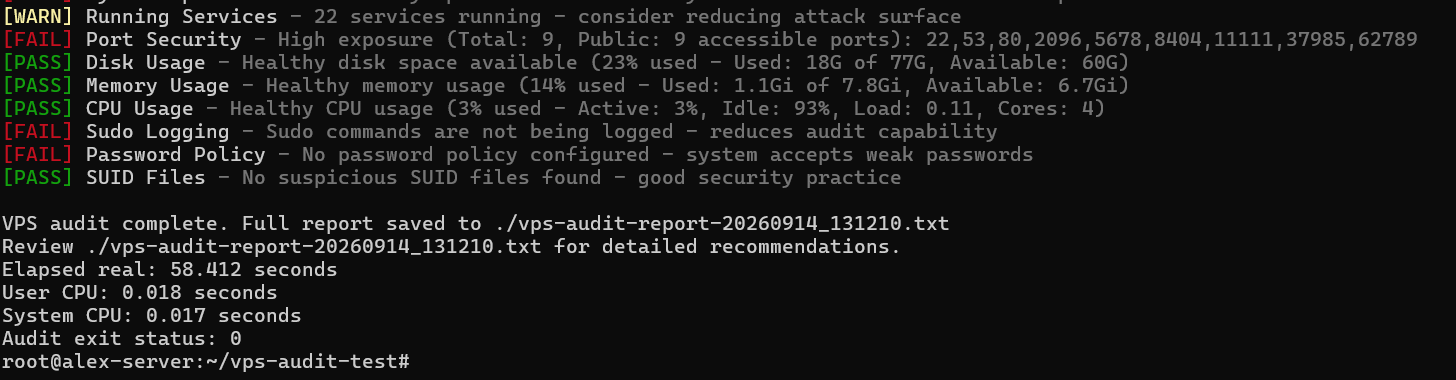
Elapsed real is wall-clock time; user and system values measure CPU time. Exit status 0 means the process completed, not that every check passed. v0.2.0 returns 0 even with FAIL results.
Select the new report, inspect its metadata, and extract counts and examples without displaying the sensitive file in full.
REPORT=$(ls -1t ./vps-audit-report-*.txt 2>/dev/null | head -n 1)
if [ -z "$REPORT" ]; then
    printf 'No vps-audit report found in the current directory.\n' >&2
    exit 1
fi
printf 'Report selected: %s\n' "$REPORT"
sudo stat --format='Owner: %U:%G | Mode: %A (%a) | Size: %s bytes | Modified: %y' "$REPORT"

for status in PASS WARN FAIL; do
    count=$(sudo grep -c "^\\[$status\\]" "$REPORT" || true)
    printf '%s: %s\n' "$status" "$count"
done

sudo grep -E '^\[(PASS|WARN|FAIL)\] (Running Services|Disk Usage|Password Policy)' "$REPORT"

The report’s 13:13:08 UTC modification time matched the run. It contained 17 results: six PASS, three WARN, and eight FAIL. These are classifications, not a security score.
Status totals are useful when comparing runs of the same version, but always inspect the lines behind a change. A lower FAIL count may come from different input or parser behavior rather than an improvement. An unchanged total can also hide one resolved problem and one new one.
The 2,665-byte report belonged to root:root with mode 644 (-rw-r--r--), as expected with sudo and stock ENABLE_CHOWN=false. Group and other users can read that mode if directory permissions let them reach the file. Root ownership alone does not make it private.
❗ Important: The report contains the hostname, public IP, system details, and findings. Keep it private, and redact identifiers, prompts, and sensitive service information before sharing.
If a future run lacks one status, record that absence rather than reconfigure the VPS to manufacture a color.
How to Read PASS, WARN, and FAIL Without Overreacting
The dashboard labels report how each test matched v0.2.0’s rules:
| Label | Correct reading | What it does not prove |
|---|---|---|
| PASS | The observed value matched this rule’s expectation. | That the service or VPS is secure. |
| WARN | The value crossed a review threshold or produced a contextual signal. | That a vulnerability exists. |
| FAIL | The rule found a stronger mismatch with its built-in expectation. | That compromise occurred or an immediate change is correct. |
Separate the observation from the recommendation. In “22 services running,” the count is the observation; “reduce attack surface” is advice based on a generic threshold. Confirm the count, identify the services, and then decide whether that advice fits the server.
Ask three questions of every result: Is the value accurate? Is it intentional? What is the realistic impact? Native commands check the value; workload context determines the rest.

The SSH-port WARN is policy-based: v0.2.0 flags port 22. Moving SSH may reduce automated noise but cannot replace strong authentication or access controls. A known service on port 22 may matter less than an unknown wildcard listener.
For a FAIL, inspect the rule before proposing a fix. The root-login test accepts only PermitRootLogin no, so the distinct prohibit-password setting still fails. Check OpenSSH directly before acting.
A PASS also needs context. For unattended-upgrades, the script confirms only that the package exists—not its configuration or run history.
Verify High-Impact Findings with Native Commands
Use read-only native commands to check SSH access, host filtering, and local listeners. First, ask what OpenSSH actually resolves after defaults and included configuration are combined:
sudo sshd -T \
  | grep -E '^(port|listenaddress|permitrootlogin|passwordauthentication|kbdinteractiveauthentication|pubkeyauthentication) '

Ubuntu loads /etc/ssh/sshd_config.d/*.conf near the start of its main configuration. sshd -T resolves the combined settings, making it stronger evidence than grepping one file.
OpenSSH resolved port 22 on wildcard IPv4 and IPv6 addresses. It also returned permitrootlogin yes, passwordauthentication yes, pubkeyauthentication yes, and kbdinteractiveauthentication no. The resolved configuration confirms the script’s root-login and password-authentication findings, although account state, PAM, and Match rules can still affect a specific login.
Second, ask what UFW itself reports about its state and managed policy:
sudo ufw status verbose
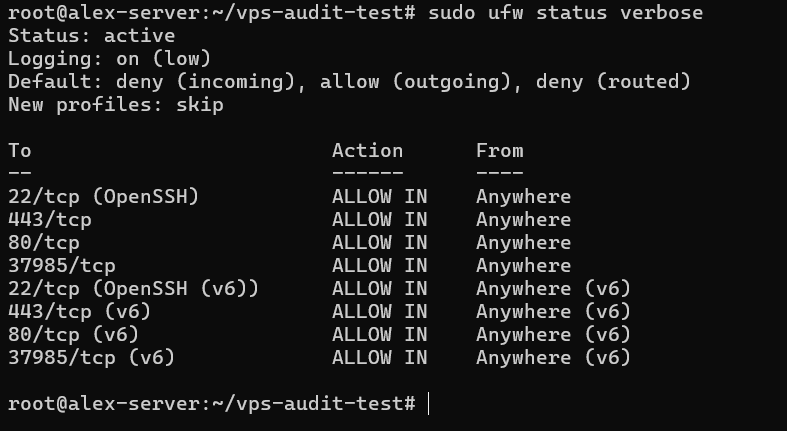
Ubuntu documents UFW as its default firewall frontend. Here it was active with low-level logging and default-deny policies for incoming and routed traffic. Rules allowed inbound ports 22, 80, 443, and 37985 over IPv4 and IPv6. This confirms UFW’s state, not whether each rule is appropriate.
Third, inventory local TCP and UDP listeners, bind addresses, and owning processes:
sudo ss -lntup
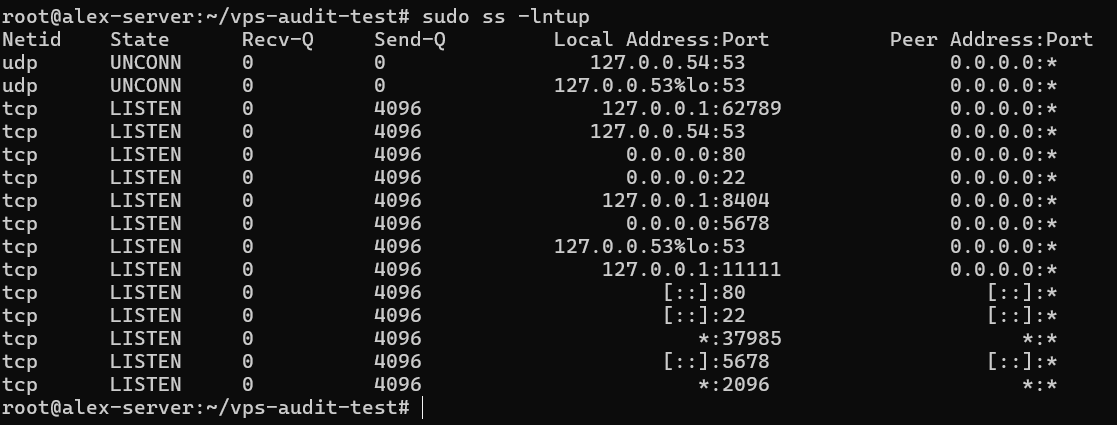
The options select numeric TCP and UDP listeners and request process details. Ports 53, 62789, 8404, and 11111 were loopback-only; ports 22, 80, 2096, 5678, and 37985 used wildcard addresses. No process details appeared, so their owners and purposes remain unknown.
process listener
    → bind address / interface
    → host firewall
    → provider-edge firewall or NAT
    → external network path
Ports 22, 80, and 37985 had both wildcard listeners and UFW allow rules. UFW allowed 443 without a listener, while 2096 and 5678 had listeners without displayed allow rules.
A firewall rule and a listener answer different questions. The rule permits traffic if a service is there to accept it; the listener shows a service waiting, but not whether network traffic can reach it. Reading both together narrows the investigation without claiming external exposure.
📝 Note: ss shows local bind state, and UFW shows one host firewall. Neither proves Internet reachability across provider firewalls or NAT; that requires authorized testing from another system.
v0.2.0 nevertheless labels the same list “Total” and “Public” after discarding bind addresses, even though four of nine TCP ports were loopback-only. Its LISTEN filter also misses UDP rows marked UNCONN. Read this result as a local TCP port count, not public exposure.
Turn Verified Findings into a Practical Action Queue
Set priority by confidence, exposure, impact, and intent. Priority 1 covers confirmed weaknesses that need action. Priority 2 covers important findings that still need investigation, while Priority 3 covers lower-risk or policy-driven items. If a setting is intentional, document why, any compensating control, and when to review it.
The table applies that approach to this run; incomplete evidence keeps a priority tentative:
| Finding | What is known | Priority | Next step |
|---|---|---|---|
| Root login and SSH password authentication enabled | Confirmed by sshd -T | Priority 1 unless explicitly required | Follow a separate SSH-hardening procedure with tested recovery access. |
| Port 37985 may be reachable | Wildcard listener and UFW rule; owner and external path unknown | Priority 2; Priority 1 if unintended and reachable | Identify the service and check provider controls and external reachability. |
| Ports 2096 and 5678 are unexplained | Wildcard listeners; no displayed UFW rules or process details | Priority 2 until identified | Map each socket to its service, owner, purpose, and dependencies. |
| 16,051 failed logins reported | Log source, period, and patterns not verified | Priority 2; escalate evidence of compromise | Review stored authentication logs separately. |
| 12 upgrades and a restart reported | Security relevance not verified | Priority 1–2 based on exposure and impact | Review package metadata and plan an application-aware maintenance window. |
| Sudo logging and password policy failed | Actual logging and authentication policy not verified | Priority 3 unless stronger evidence raises risk | Check the real configuration and document any intentional exception. |

Priority 2 does not mean harmless; evidence remains incomplete. Give each unresolved item an owner and deadline. Promote it if verification confirms exposure or weakness. If it is intentional and controlled, record the decision clearly.
The report label does not set the order: verification and context do.
⚠️ Warning: Do not change SSH authentication or remote firewall rules from this command sequence. A mistake can lock you out. Before remediation, confirm tested key access and validate the new configuration. Keep a second session open and ensure console or recovery access works.
Handle each remediation as a separate workflow. Map dependencies before stopping services, classify updates before scheduling them, and verify ownership and checksums before changing SUID permissions.
Where vps-audit’s View Stops
vps-audit v0.2.0 is a point-in-time Bash checklist. It cannot establish external exposure, detect vulnerabilities or malware, inspect workloads, analyze stored logs, or provide continuous monitoring. It is not a penetration test or CIS Benchmark assessment.

The code adds important caveats.
- Port status becomes PASS below three parsed TCP ports, WARN at three or four, and FAIL at five or more—despite the nominal 10/20 variables.
- An unattended-upgrades PASS checks only for the package, not its configuration, timer, or run history.
- The update test uses cached metadata for a general apt-get -s upgrade, then calls every listed package a “security update.”
The sudo-logging test reads only /etc/sudoers, missing /etc/sudoers.d/ and normal journal or syslog records. Issue #33, open when checked on 8 September 2026, documents this false FAIL on Ubuntu 20.04 and 24.04. Parsing can also fail with non-English output, as tracked in open issue #37. Despite its README wording, this release does not list established connections.
Widen the review when needed. Suspicious behavior calls for stored-log and workload analysis. For an important VPS, confirm tested backups and consider authorized external testing. Critical or regulated systems may warrant Lynis, the Ubuntu 24.04 CIS Benchmark, or professional review.
Bottom Line: Verify, Prioritize, and Recheck

Keep the original report private and maintain a redacted copy. Record the script’s SHA-256, tag, and commit together with the run time, intended services, verification results, and action queue.
- Verify high-impact findings with native commands before changing the server.
- Fix confirmed high-risk problems safely, investigate unknowns, and document intentional exceptions.
- Rerun the same pinned version after changes or on a schedule, then compare reports manually.
When comparing reports, focus on authentication changes, firewall rules, listeners, and resolved findings. Timestamps and resource readings will move. Note deliberate changes so the next reviewer understands why results differ.
vps-audit has no baseline database, scheduler, trend analysis, or comparison engine. Its value comes from a repeatable habit: run, verify, prioritize, and recheck.