 Open Ticket
  +373 79 600002
  Telegram Live Chat
  F.A.Q
F.A.Q  English
 Русский
  Română
  Deutsch
  Français
  Türkçe
  Español
  Português
  Українська
  български
  Polski
  Indonesia
  中文 (中国)








































































































































What Is Email Hosting? How It Works, Why It Matters, and When You Need It
From Inbox to Identity: The Role of Email Hosting

An invoice from billing@yourcompany.com feels normal. An invoice from yourcompanyhelp123@gmail.com feels like something you pause over. The difference is not just cosmetic. It signals trust, ownership, and whether the business behind the message looks established enough to take seriously.
That is why email changes the moment it represents a business, a team, or even a serious side project. At that point, email is no longer just an app. It becomes part of your communication infrastructure. The service behind the address affects routing, security, account control, and how legitimate your messages appear.
This article explains what email hosting is, how it works with your domain, how it differs from adjacent services, which hosting models exist, and when professional email is worth caring about.
Keywords
If several terms in this article sound similar, that is normal. This quick glossary covers the words and phrases most likely to cause confusion before the deeper explanation begins.
| Keyword | Brief explanation |
|---|---|
| 🌐 Domain | The name layer behind an address like yourcompany.com. |
| 📬 Email hosting | The service that runs mailboxes on your domain. |
| 🖥️ Email client or webmail | The interface you open to read and send mail. |
| ↪️ Email forwarding | Sending mail from one address into another inbox without creating a full mailbox on the domain. |
| 🏷️ Alias | An extra address that points to an existing mailbox instead of being a separate mailbox by itself. |
| 👥 Role address | A function-based address such as support@yourcompany.com or sales@yourcompany.com. |
| 🌍 DNS | The record system for a domain that tells the internet where different services for that domain should go. |
| 📮 MX records | DNS records that tell other mail systems which service should receive incoming mail for the domain. |
| 🖧 Mail server | The system that sends, receives, filters, and stores email. |
| 📤 SMTP | The sending side of email. |
| 📥 IMAP | A mail access method that syncs messages between the mailbox and the app you use to read them. |
| 📦 POP3 | A mail access method for retrieving messages, often with less syncing behavior than IMAP. |
| 🛡️ SPF | A record that lists which servers are allowed to send mail for your domain. |
| ✍️ DKIM | A digital signature that helps receiving servers verify that a message is legitimate and was not altered in transit. |
| 🚨 DMARC | A policy that tells receiving servers what to do with suspicious mail that claims to be from your domain. |
| 🧭 DNS management | The control layer where you manage the records that point your domain to services such as websites or email. |
| 🔄 Reverse DNS | A record that maps a server IP address back to a domain name and is often part of trusted mail delivery. |
| 🖥️ VPS | A virtual private server that some people use when they want to self-host email infrastructure. |
What Email Hosting Actually Is — and What It Isn’t
Email hosting is the service that runs mailboxes on your domain. If you want addresses like sales@yourcompany.com, support@yourcompany.com, or jobs@yourcompany.com, email hosting is the layer that sends, receives, stores, and administers those messages. Your domain gives you the name. Email hosting makes that name function as a real mailbox system.

A useful way to picture it is as a mailroom for your domain. The domain is the street address on the building. The email hosting service is the staffed mailroom inside it — the part that accepts incoming mail, routes outgoing messages, stores what arrives, and applies rules around access, spam filtering, and account management. Without the mailroom, the address exists, but mail is not being properly handled.
| Layer | What it is | What it does not replace |
|---|---|---|
| Domain | Your address on the internet, such as yourcompany.com | A mailbox service by itself |
| Email hosting | The service that sends, receives, stores, and manages mail on that domain | The app you use to read mail |
| Email client or webmail | The interface you open, such as Gmail, Outlook, Apple Mail, or Thunderbird | The infrastructure behind the mailbox |
| Bulk email platform | A service for marketing campaigns or transactional sending at scale | A normal day-to-day business mailbox system |
Note: Email forwarding is not the same as full email hosting. Forwarding can send messages from info@yourcompany.com into a Gmail inbox, but it does not create a true mailbox on your domain with storage, admin controls, security policies, and its own managed sending environment.
Gmail and Outlook are good examples of why this topic gets confusing. People often use those names to mean “email service” in general, but they can describe different layers. Gmail can mean a free personal mailbox, or it can be the interface for a Google Workspace account on a custom domain. Outlook can be the app, the interface, or part of a hosted Microsoft 365 setup. The inbox you open is not always the same thing as the hosting behind it. The same distinction explains aliases and role addresses like hello@yourcompany.com or support@yourcompany.com: they depend on a managed mail system, not just a purchased domain.
How Email Hosting Works at a High Level
Once the definition is clear, the mechanics become much less intimidating. At a high level, email hosting works by connecting your domain to a mail service through DNS records. The simplest mental model is still postal: your domain is the address, DNS tells the internet where to send the mail, the mail server acts like the post office or mailroom, and your inbox app is the place where you read what arrived.
Mail flow at a glance: domain → DNS/MX records → mail service/server → webmail or email client
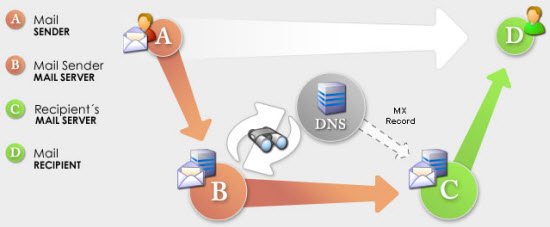
- Your domain creates the email identity. It is the naming layer behind addresses like name@yourcompany.com.
- DNS, especially MX records, routes mail. MX records tell the internet which service should receive incoming mail for that domain.
- The mail service or server does the real work. It handles sending, receiving, filtering, and storing messages.
- Users access the mailbox through software. That might be webmail, or an email client such as Gmail, Outlook, Apple Mail, or Thunderbird.
MX records sound technical, but the job is simple: they are routing instructions. When someone sends a message to you@yourcompany.com, other mail systems look up the domain’s MX records to find out which service is responsible for accepting that mail. That is why email hosting is tied so closely to domain control. The mailbox depends on the address layer knowing where to deliver messages.
You will also see a few protocol names around this stack. SMTP is the sending side. IMAP and POP3 are access methods, meaning the ways an inbox app can retrieve or sync stored mail. You do not need to memorize them to understand the bigger point: the client is only the access layer. The host is the service behind it. That is also why moving email to a different host usually does not move your website. Website hosting and email routing can live on different services because they rely on different records and services.