 Open Ticket
  +373 79 600002
  Telegram Live Chat
  F.A.Q
F.A.Q  English
 Русский
  Română
  Deutsch
  Français
  Türkçe
  Español
  Português
  Українська
  български
  Polski
  Indonesia
  中文 (中国)







































































































































VPN vs VPS: Clear Explanation of the Differences
Keywords
| Keyword | Quick explanation |
|---|---|
| 🔒 VPN | A virtual private network that encrypts your connection and routes your traffic through a VPN server. |
| 🖥️ VPS | A virtual private server that gives you an isolated server environment with its own resources and admin control. |
| 🌐 VPN server | The remote endpoint your device connects to when a VPN is turned on, and the address websites see instead of your original one. |
| 📱 VPN client | The app or operating-system feature you use to connect your device to a VPN server. |
| 🔐 Encrypted tunnel | The protected connection created between your device and the VPN server so local networks cannot easily read the traffic inside it. |
| 📍 IP address | The public internet address attached to your connection; with a VPN, websites see the VPN server’s IP instead of your original one. |
| 🏠 Self-hosting | Running software yourself on infrastructure you control instead of relying entirely on a third-party service. |
| ☁️ Cloud VPS | A practical place to run VPN server software because it usually has a public IP, stays online, and is reachable over the internet. |
| 🧱 Server environment | The isolated operating system and resources you control inside a VPS, including CPU, RAM, storage, users, and services. |
| 🖧 Remote access | A common VPN use case where you securely reach office, home, or internal resources across the internet. |
| 🚀 Hosting | The job a VPS is built for: running websites, apps, databases, game servers, and other self-hosted services. |
VPN vs VPS: What’s the Difference?
The mix-up is easy to understand. Both start with “virtual private.” Both can involve remote servers. Both show up in searches about security, access, and hosting. But the wrong choice has real consequences. Renting a VPS because you wanted safer café Wi‑Fi browsing will not protect your traffic by itself. Buying a VPN because you needed a place to run a website or database solves the opposite problem. The cleanest way to separate them is this: a VPN is about how traffic travels; a VPS is about where software runs.
VPN vs VPS in One Minute
| VPN | a virtual private network that encrypts your connection and routes your traffic through a VPN server. |
| VPS | a virtual private server that gives you an isolated server environment with its own resources and admin control. |
📝 Note: They are not substitutes. A VPN protects and reroutes traffic. A VPS gives you a server to host software. You only use both together when you want to run a VPN yourself or securely manage services on a server.
That overlap is the source of most confusion. A VPN is a network tool. A VPS is infrastructure. Same first letters, completely different job descriptions.
What is a VPN, in simple words
Simply put, a VPN creates a secure tunnel that connects your device to a VPN server before reaching the internet: device → VPN server → internet.
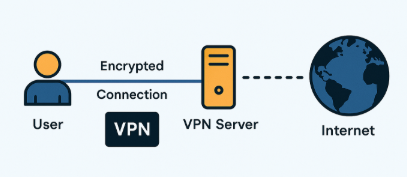
That changes the path your traffic takes, which is why VPNs are commonly used for safer public Wi‑Fi, secure remote access to office or home resources, and basic location or privacy needs. If you work from hotels, airports, coworking spaces, or any network you do not fully trust, a VPN reduces how exposed your traffic is on that local network.
The best mental model is a secure tunnel or private lane for your data. You step into the tunnel on your device, travel through the VPN server, and come out onto the public internet from there. That is useful. But it does not turn the VPN into a computer you can deploy apps on. A VPN changes the route. It does not hand you a server.
Like any network tool, it also comes with trade-offs. You still have to trust the VPN provider or the server you connect to, because your traffic is exiting through that endpoint. And because your connection is being encrypted and rerouted, you may see extra latency or slower speeds compared with a direct connection.
⚠️ Warning: A VPN can reduce exposure on local networks and hide your original IP from destination websites, but it is not an invisibility cloak. It does not remove provider trust, erase all tracking, or guarantee maximum speed.
What a is a VPS, in simple words
A VPS is closer to renting an apartment inside a larger building. The building is a physical server in a datacenter. Your apartment is an isolated virtual machine inside it. You are not sharing the same operating system with everyone else in the simple sense a shared hosting account does; you get your own environment with its own allocated resources.
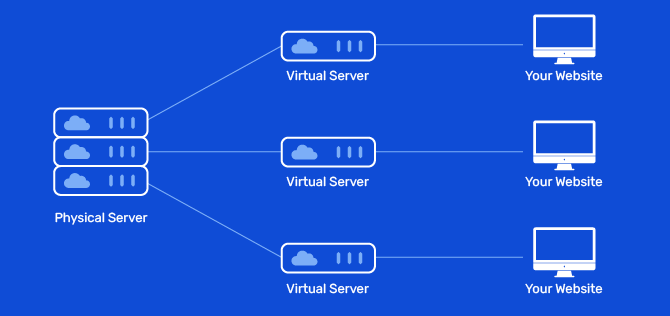
That is why VPS plans are used for websites, web apps, databases, development and testing environments, game servers, internal tools, and all kinds of self-hosted services. A VPS is not a feature by itself so much as a place where other things can live and run.
The trade-off is responsibility. More control means someone has to handle updates, firewall rules, backups, service hardening, and general maintenance. Some of that can be managed for you, some of it falls on you, but the core idea stays the same: a VPS is infrastructure. By default, it does not make your browsing private or anonymous.
📝 Note: In VPS, “private” means isolated virtual resources and your own server environment — not private browsing, hidden traffic, or automatic anonymity.
The Real Source of Confusion: a VPS Can Host a VPN

A VPS is a popular self-hosting platform because it usually gives you a public IP address, stays online all the time, and is reachable from anywhere you have internet access. That makes it a practical home for running OpenVPN, WireGuard, or another VPN server. In one sentence: a VPN is something you run; a VPS is somewhere you run it.
Self-hosting changes the trade-offs, not the category. You may get more control over logs, configuration, and remote access behavior, but you do not magically become anonymous, and you do not escape maintenance or security work. If your only goal is safer browsing with minimal effort, running your own VPN on a VPS is usually more work than you need. That’s why providers like AlexHost offer flexible options tailored to your needs: you can choose a server without a pre-installed VPN and set it up yourself, or opt for a ready-to-use VPN server that’s configured out of the box.