 Open Ticket
  +373 79 600002
  Telegram Live Chat
  F.A.Q
F.A.Q  English
 Русский
  Română
  Deutsch
  Français
  Türkçe
  Español
  Português
  Українська
  български
  Polski
  Indonesia
  中文 (中国)







































































































































Bun vs Node.js: Speed, Compatibility, and What Actually Matters
Keywords: Quick Reference Before We Start
Before getting into the comparison, here are the core terms that appear throughout the article.
| Keyword | Quick definition |
|---|---|
| ⚙️ Runtime | The environment that runs JavaScript outside the browser and gives code access to files, networking, processes, and system APIs. |
| 🧠 JavaScript engine | The part that actually executes JavaScript code. In this comparison, V8 powers Node.js and JavaScriptCore powers Bun. |
| 🟢 Node.js | The long-established server-side JavaScript runtime and the default reference point for most npm packages and frameworks. |
| ⚡ Bun | A newer JavaScript runtime that also includes built-in tooling such as a package manager, test runner, and bundler. |
| 📦 Package manager | The tool that installs and manages dependencies, such as npm in Node workflows or Bun’s built-in installer. |
| 🧪 Test runner | The tool used to execute automated tests, such as node:test or bun test. |
| 🧾 TypeScript | JavaScript with type annotations and extra developer tooling. Both Node and Bun now support parts of this workflow directly. |
| 🔌 Node-API | The interface native add-ons use to work with Node-compatible runtimes. It matters when your project depends on native modules. |
| 🔁 Compatibility | How closely a runtime matches Node’s behavior, APIs, and package expectations in real projects. |
| 📊 Benchmark | A controlled performance test that can reveal tendencies, but not the whole story of a production application. |
| 🏗️ Greenfield project | A new project without legacy constraints, which usually gives you more freedom to choose a newer runtime. |
| 🚚 Migration risk | The practical risk of moving an existing application from one runtime to another and discovering unexpected breakage. |
Why Bun vs Node.js Is a Real Decision Now
You are starting a new JavaScript project. Maybe your instinct is to reach for Node because that has been the default for years. Then you notice Bun is no longer showing up as a novelty in developer conversations. It is showing up as a real option. That changes the question from “Should I experiment with Bun?” to “Should this project run on Node or Bun from day one?”
So this article stays narrow on purpose. It is not a Deno roundup, and it is not a disguised npm vs bun install post. It is a practical Bun vs Node.js comparison focused on the things that actually change your day-to-day experience: speed, tooling, compatibility, and production fit.
What Node.js and Bun Actually Are
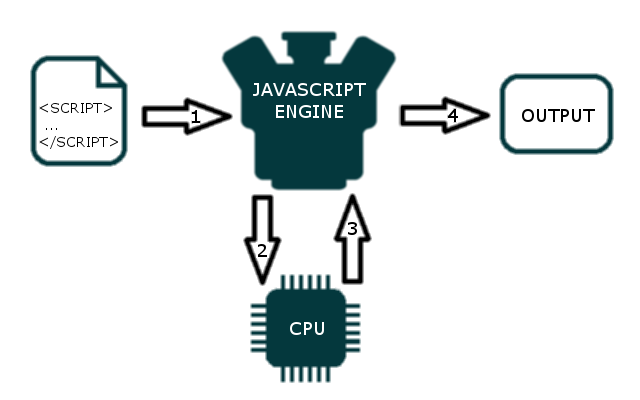
Before comparing them, it helps to get the category right. A JavaScript engine is the motor. It executes JavaScript. A runtime is the full vehicle around that motor — the part that gives your code access to files, networking, processes, modules, and the rest of the environment it needs to do real work. The bundled tools are what come in the trunk.
Bun is a newer runtime built in Zig on top of JavaScriptCore. Its pitch is broader by design: runtime, package manager, test runner, and bundler in one package. That is why Bun often feels “bigger” in comparisons. It is still a JavaScript runtime, but it ships with more first-party defaults around it.
Bun’s own docs describe it as a drop-in replacement for Node.js, and that explains a lot about its adoption strategy. But “drop-in replacement” is a goal and a direction, not the same thing as perfect compatibility in every stack. That distinction matters more as your project gets more complex.
Where Node and Bun Overlap More Than People Think

The gap between Node and Bun is smaller than many older comparison posts make it sound. Both can run server-side JavaScript. Both can run TypeScript in modern workflows. Both live close to the npm ecosystem in practice, which means the average developer is not choosing between two alien worlds.
That is especially true now that Node has closed some of the gaps older Bun-vs-Node articles still repeat. Current Node versions can run TypeScript files natively when the code uses erasable syntax — meaning type annotations and other syntax that can be stripped away without changing runtime behavior. Node’s built-in test runner is also stable and far more capable than its earlier reputation suggests.
That freshness matters because it resets the comparison. Bun is not the only runtime with a modern developer experience story anymore, and Node is not the stripped-down baseline it is sometimes portrayed to be. The real choice is about trade-offs: Bun still feels more integrated, while Node still feels more universal. With that overlap established, the first major question is the one readers usually ask first anyway: performance.
Performance: Where Bun Is Faster, and Why That Still Doesn’t Settle the Debate

That matters because developers feel performance long before they measure it formally. Faster installs make a project feel lighter. Faster startup makes local scripts and dev servers feel snappier. Faster simple-runtime execution can also make Bun attractive for small APIs, command-line tools, and other workloads where overhead shows up immediately.
📝 Note: Benchmarks are directional, not verdicts. They are useful for spotting tendencies, but they usually isolate one layer of the stack. Real applications add frameworks, I/O, database calls, dependency trees, caching, and deployment conditions that can completely change the result.
That last point is where benchmark-driven conclusions usually break down. A runtime can dominate synthetic tests and still lose inside a framework-heavy production setup. A concrete example: Platformatic’s January 2026 Next.js benchmark on AWS EKS reported Node averaging about 16.44ms while Bun averaged about 233.76ms in that specific configuration. The lesson is not that Node is “really faster.” The lesson is that workload shape matters more than headline charts.
So the better question is not “Which runtime is faster?” It is “Which runtime is faster for what I am actually running?” If your work is dominated by installs, startup time, small scripts, or simple services, Bun’s edge is meaningful. If your application lives inside a heavier framework or a mature production stack, you need to measure the stack itself — not assume the benchmark table already made the decision for you.