Open Ticket
  +373 79 600002
  Telegram Live Chat
  F.A.Q
F.A.Q  English
 Русский
  Română
  Deutsch
  Français
  Türkçe
  Español
  Português
  Українська
  български
  Polski
  Indonesia
  中文 (中国)






































































































































 on All Hosting Services






What Is XDP and How Can It Help Build Anti-DDoS Protection?
XDP Introduction, and How Can It Help Build Anti-DDoS Protection?

If you run a public API, reverse proxy, game service, or any other internet-facing workload, you can hit a painful point where the server is busy on traffic that was never useful in the first place. The application is not necessarily failing because it cannot handle real users. It is failing because the host is spending CPU time receiving, parsing, classifying, and carrying junk packets deeper into Linux before anything says “no.” Many anti-DDoS problems start there: not as a bandwidth story, but as a packet-processing-cost story.
That matters to more than kernel specialists. Developers, self-hosters, VPS and dedicated server operators, and even business readers comparing resilience options all run into the same basic question: how early can bad traffic be rejected before it burns time and resources that should belong to real work? Some attacks crush the uplink itself, but many damaging situations show up earlier as packets-per-second pressure on the host long before the line is fully saturated.
That is where XDP becomes worth understanding. It does not replace upstream mitigation, a firewall, or application-aware controls. What it does offer is a much earlier checkpoint in the Linux packet path. This article explains what XDP is, why that “earlier” position matters for anti-DDoS work, and where it fits in a realistic stack. To follow the rest, you only need a very small vocabulary set first.
XDP Keywords You Need in 2 Minutes
Several of the terms around XDP overlap, and at first they sound more intimidating than they really are. That is normal. The point of this glossary is not to turn the article into a Linux internals lesson. It is just enough language to help the rest of the explanation land cleanly.
| Term | Plain-language meaning |
|---|---|
| 📦 XDP | A Linux packet-processing hook that can make an early decision about an incoming packet before the normal networking stack does more work on it. |
| 🧩 eBPF | A safe programmable mechanism inside the Linux kernel that lets small programs run at specific hook points. |
| 🔌 NIC driver | The software layer that lets Linux talk to a network card and receive packets from it. |
| 🛠️ kernel networking stack | The normal path Linux uses to process packets after they arrive, including routing, firewalling, sockets, and delivery to applications. |
| 🐧 native mode | The faster XDP path where the program runs in the driver receive path as early as the hardware and driver support allow. |
| 📥 skb / generic mode | A compatibility mode where XDP still works conceptually, but later in the path and with less performance benefit than native mode. |
| 🔑 BPF maps | Shared key-value tables that let a running XDP program and user-space tools exchange data such as rules or counters. |
| 🚦 xdp-loader | A user-space tool for attaching, inspecting, and managing XDP programs on interfaces. |
| 🧹 xdp-filter | A simple XDP-based filtering utility that makes XDP behavior easier to demonstrate without writing custom eBPF code. |
If you keep only one mental shortcut from that table, make it this: eBPF is the programmable mechanism, and XDP is one specific place where that mechanism can run. With that in place, the next step is a simpler and more useful question: what is XDP actually doing?
What XDP Actually Is

XDP is an early packet-processing hook in Linux. It lets the system run a small eBPF program on a packet as soon as that packet arrives on a network interface. At that moment, Linux can make a fast decision: let the packet continue (XDP_PASS), drop it immediately (XDP_DROP), or handle it in another defined way. For this article, the important part is simple: XDP can say “let it through” or “stop it here” very early.
Linux uses eBPF in several contexts, not just networking. XDP is the networking-focused version built for very early handling of incoming packets. So XDP is not another word for eBPF. It is one eBPF-based tool with a very specific role.
That role is what makes XDP useful for anti-DDoS work. XDP runs before packets go through the normal, heavier parts of the Linux networking path. Thus, Linux can decide on some traffic before it spends more effort on firewalling, connection tracking, sockets, and eventually the application itself. That is why real advantage of XDP is not only filtering — it is filtering earlier.
Additionally, XDP is useful for more than anti-DDoS. It can also support traffic steering and other packet-handling tasks. But anti-DDoS is the easiest place to see its value, because the benefit comes down to one practical idea: the sooner bad traffic is rejected, the less useless work the server has to do. And to understand why that matters so much, the next step is to look at exactly where XDP sits in the packet receive path.
The Mental Model: XDP Is the Gate, Not the Reception Desk

The easiest way to picture XDP is as a security guard at the gate, not a receptionist deeper inside the building. If an obviously unwanted visitor is turned away at the gate, the building avoids a long chain of pointless work. Nobody opens the inner door, checks them into a system, or walks them through the hallway. If you wait until the reception desk to reject them, the building already spent time and attention on the wrong person.
Linux packet handling works the same way. In a simplified receive path, the packet arrives from the NIC and driver, reaches XDP, and only then continues into the richer kernel networking stack that feeds conntrack, firewalling, sockets, and finally the application. Put visually, the path looks like this:
NIC / driver
    ↓
XDP  ← earliest checkpoint
    ↓
kernel networking stack
    ↓
conntrack / firewall
    ↓
socket
    ↓
application
In native mode, XDP can act before Linux allocates and fills the usual sk_buff structure — the richer kernel packet object the rest of the stack expects. That detail sounds small, but it is the heart of the performance story. If the packet is obviously unwanted, dropping it before Linux builds that normal structure means less CPU work, less memory churn, and less downstream pressure. XDP_PASS exists because not every packet is bad; it is the “carry on” action that lets legitimate traffic keep moving. XDP_DROP is the anti-DDoS star because it ends the journey before the expensive part begins. Other actions such as REDIRECT exist too, but they are not load-bearing for this explainer.
Once the placement is clear, the anti-DDoS value — and the limitations — become much easier to judge realistically.
How XDP Helps Anti-DDoS — and Where Its Limits Start

The anti-DDoS case for XDP is straightforward: it is a cheap way to reject obvious garbage before Linux spends resources on conntrack, socket handling, and user-space delivery. If a host is being peppered with high-rate traffic that should never reach the application anyway, every packet dropped early is work the server no longer has to do later. That is why XDP is strongest at the L3/L4 edge of the problem: source addresses you already distrust, protocols you do not want, or traffic patterns that are clearly not legitimate for the workload.
This matters most during junk floods where the painful part is not raw data volume but repeated packet handling. A reverse proxy, UDP-heavy service, or public API can become slow long before the uplink is fully saturated if the host is busy classifying nonsense. XDP gives you a way to cut off some of that waste close to the door.
📝 Note: XDP protects host resources better than it protects a saturated upstream link. If the provider-facing link is already full, host-level early drop is too late to fix the network path by itself.
That distinction is the main reason XDP belongs in a layered design rather than on a pedestal. The following table is the practical version of XDP vs nftables vs upstream/provider mitigation:
| Layer | Where it acts | What it protects best | What it cannot solve alone | Best role in the stack |
|---|---|---|---|---|
| XDP | At the earliest host receive checkpoint | CPU and packet-path cost from obvious unwanted traffic | A saturated uplink, stateful policy, or application-aware filtering | First-pass early drop layer |
| nftables | Deeper in the host networking stack | Stateful firewalling, richer policy, service-aware host controls | The extra host work already spent getting packets that far | Main host firewall and policy layer |
| Upstream / provider mitigation | Before traffic fully reaches your server | Link saturation, larger volumetric floods, broader edge filtering | Fine-grained host context or app-specific local policy | Outer mitigation layer before the server |
In other words, XDP and nftables are not enemies. They solve different parts of the path. nftables is richer and stateful. xdp-filter — the demo tool used in this article — is intentionally simple and stateless, which is exactly why it is useful for showing the XDP model without pretending to replace a full firewall. If you need connection tracking, layered allowlists, reply-state handling, or application-aware rules, you are already describing problems that belong deeper than this demo utility.
Production operators do use XDP-style dropping because early discard reduces downstream work. Cloudflare’s L4Drop story is a well-known example of why that model became attractive in real operations. But the important lesson is not only the headline packet-per-second number. It is the design logic: reject bad traffic earlier so the rest of the machine can keep serving real traffic longer.
Real-world results depend heavily on the environment. NIC and driver support, whether XDP runs in native or skb mode, and the shape of the incoming traffic all affect how much benefit you actually get. That is why headline packet-per-second figures from vendors or hyperscalers are best treated as proof that the early-drop model works, not as numbers every VPS should expect. With that in mind, the next section shows what XDP looks like on a real Ubuntu host through a few safe operator snapshots.
What XDP Looks Like in Practice — Command Snapshots

This section is a proof-of-concept snapshot. The goal is to make XDP feel real on Ubuntu 24.04 with the relevant set of commands: enough to load a filter, inspect what attached, add one low-risk rule, and read the counters that matter.
Before proceeding to XDP setup, you need to discover and select the interface name first.
ip -br link
Install the prerequisites.
sudo apt update
sudo apt install -y xdp-tools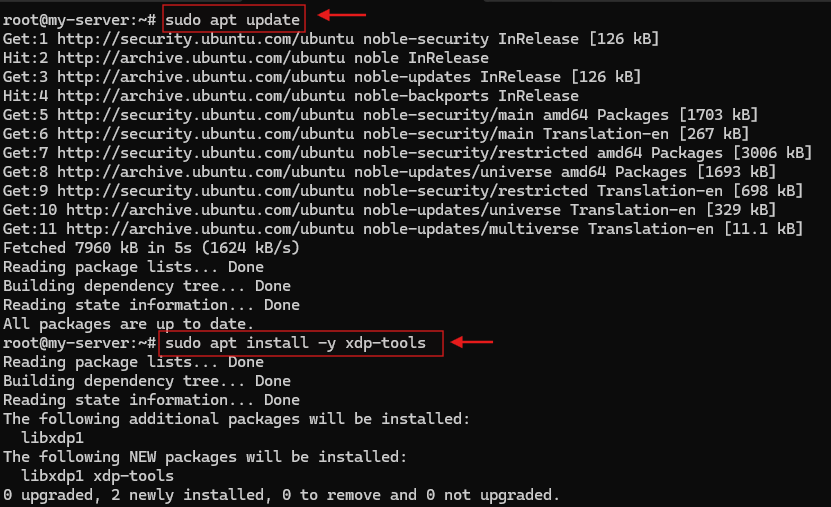
In the command below, replace <ifname> with your actual network interface name, such as eth0 or ens3.
sudo xdp-filter load -m skb <ifname>The first two commands are responsible for installing the required tools, ensuring that the environment has everything needed to run the demo.
The third command then loads xdp-filter in skb mode with the default allow policy. On the Ubuntu host used for this article, that produced the xdpfilt_alw_all variant with the full tcp,udp,ipv6,ipv4,ethernet,allow feature set. Choosing -m skb avoids assuming native XDP support in your NIC or driver, making it the safer path for a first proof of concept.
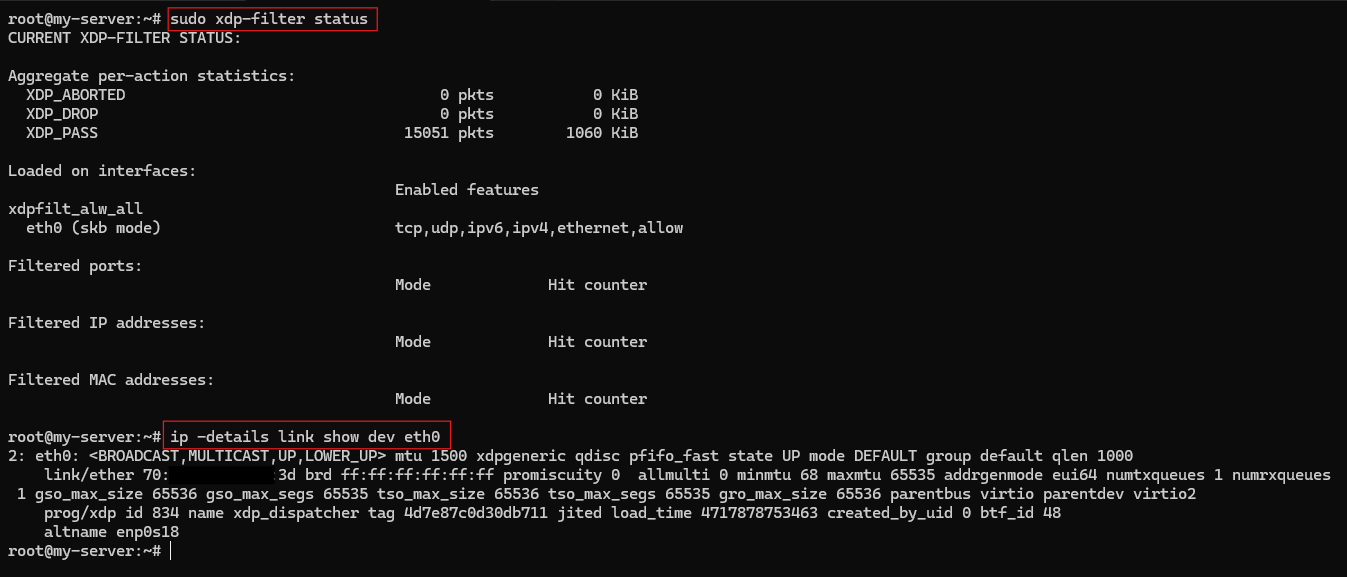
To verify that the program actually attached, run:
sudo xdp-filter status
ip -details link show dev <ifname>
In xdp-filter status, you want to see your interface listed with skb mode; on the test host here, the loaded feature set showed tcp,udp,ipv6,ipv4,ethernet,allow. In ip -details link show, an xdpgeneric attachment and the xdp_dispatcher program confirm that generic XDP is active on that interface.
⚠️ Warning: Do not test deny-default policies or broad drop rules on a live remote interface that is carrying your SSH session unless you have console recovery. This article stays with an allow policy and one documentation-address rule for exactly that reason.
Next, inspect the capability discovery. This tells you what the NIC and driver expose in the XDP surface, not what your final performance will be.
sudo xdp-loader features <ifname>The exact output varies by hardware, but a representative result often contains lines like these:
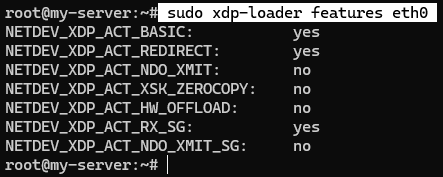
What matters most here is NETDEV_XDP_ACT_BASIC, because that tells you the path exposes the core XDP action model. Extra flags such as redirect support are useful, but they are not required for a simple anti-DDoS proof of concept.
Next, verify how the XDP loader is managing the program and which mode it’s running in.
sudo xdp-loader statusOn a working system, a status view may look like this:
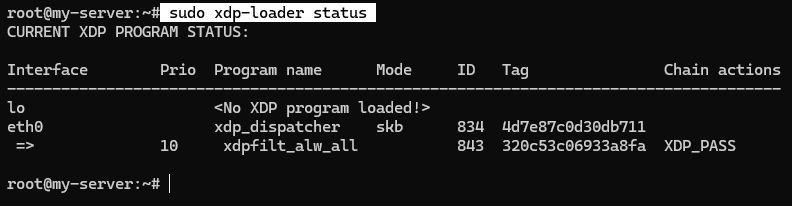
This is a small but important operator check. It confirms that XDP is not just a rule concept living in user space — there is a loaded program on the interface, and the mode column tells you whether you are looking at native or skb.
Now add one safe example rule using a documentation IP address. The -s flag is helpful because it prints the resulting rule state immediately instead of leaving you with a silent success.
sudo xdp-filter ip -s -m src 192.0.2.1A representative response may look like this:

📝 Note: xdp-filter defaults to an allow policy. In other words, packets that match the rule are dropped, and packets that do not match the rule continue through the normal path.
This example is intentionally boring. In anti-DDoS terms, it also shows the simplest possible version of an early drop rule: traffic from a source you do not want can be rejected before the rest of the host invests much work in it.
Finally, inspect the overall state in one place.
sudo xdp-filter statusOn a typical system, the output pattern is the most informative one.
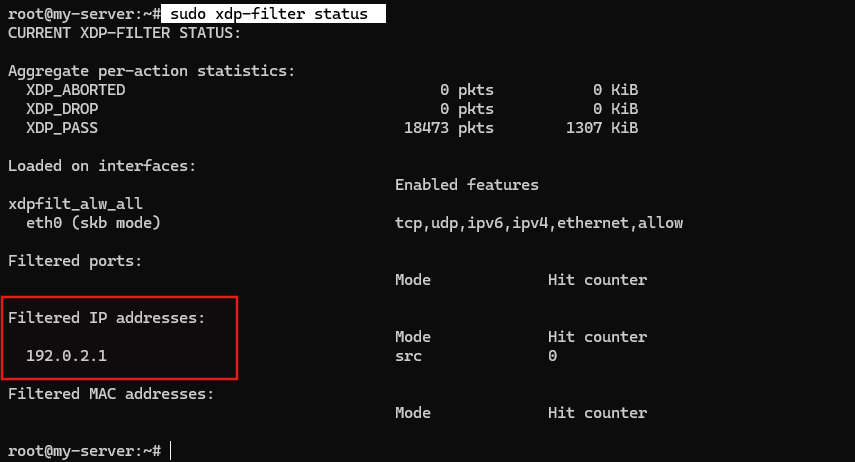
This status view is where the proof of concept becomes operationally useful. You can see the loaded interface, the active mode, the active xdp-filter variant, the effective feature set, and the per-rule counter state in one command. XDP_ABORTED, if it appears, is mainly an error/debug bucket rather than the action you plan around. More importantly, if the drop counter stays at 0, that does not mean the filter failed. It only means no matching packet hit the rule during the capture window.
💡 Takeaway: Treat xdp-filter as a simple, stateless proof-of-concept tool, not a replacement for nftables. Also keep in mind that packets dropped at the XDP layer may never appear in the usual tcpdump path, which makes XDP-native status output and counters the more reliable validation method. If you want a live view later, sudo xdp-filter poll -i 2000 is a sensible optional next step — but only when the interface already has enough interesting traffic to make that output useful.
Seeing a safe demo makes the idea concrete. The real decision, though, is not whether the commands run. It is whether this extra layer is worth the operational complexity on the kind of infrastructure you actually manage.
When XDP Is Worth Considering for VPS and Dedicated Servers

XDP becomes interesting when a public-facing workload is losing meaningful CPU time to unwanted packets before the application can respond normally. Good candidates include public APIs, reverse proxies, gateways, internet-exposed UDP-heavy services, and hosts that regularly see enough junk traffic to stress the networking path even when the application itself is not the bottleneck. In those environments, earlier rejection can buy back real server headroom.
There are also plenty of cases where simpler filtering is enough. A low-traffic website, an internal tool, a staging box, or a service whose real requirement is stateful host firewalling rather than packet-rate relief usually does not need XDP first. If nftables already covers the risk without noticeable packet-path pressure, adding another layer may create more moving parts than value.
As a quick decision framework:
- Firewalling is usually enough when traffic is light, the policy needs state or richer service logic, and the host is not visibly burning CPU on junk packets.
- XDP becomes worth evaluating when unwanted traffic is reaching the host often enough that early drop could protect CPU, conntrack, and socket capacity.
- Upstream mitigation remains mandatory when the real failure mode is provider-link saturation or larger volumetric flooding before the packets even reach your server.
VPS users should keep one caveat in mind: virtual NIC paths and provider abstraction can limit native-mode expectations even when skb mode works fine for a demo. Dedicated servers usually give you more control over drivers, hardware, and observability, so the odds of meaningful native-mode support are better there — but even on bare metal, XDP is still one layer, not the whole answer. If you are evaluating AlexHost or any other provider, ask three separate questions instead of rolling them together: what upstream DDoS handling exists, how much host headroom does the plan give you, and what host-level controls are realistic on that platform?
Conclusion: XDP Is an Early-Drop Layer, Not the Whole Shield

The cleanest way to think about XDP is this: it gives Linux a fast first checkpoint for obvious bad traffic and packet floods, which means it protects server resources better than it protects a saturated upstream link. That is why XDP matters in anti-DDoS conversations. It does not replace upstream mitigation, stateful firewalling, or application-aware controls. It helps by making the host do less pointless work.
So the rule of thumb is simple. If unwanted traffic is wasting host CPU before real workloads can respond, XDP is worth evaluating as an early-drop layer. If the main problem is a full uplink or policy that depends on state and application logic, XDP belongs behind upstream mitigation and deeper filtering rather than in front of them as a complete answer. A natural next step from here would be a follow-up on writing custom XDP programs or building a richer layered defense around the same early-drop idea.